
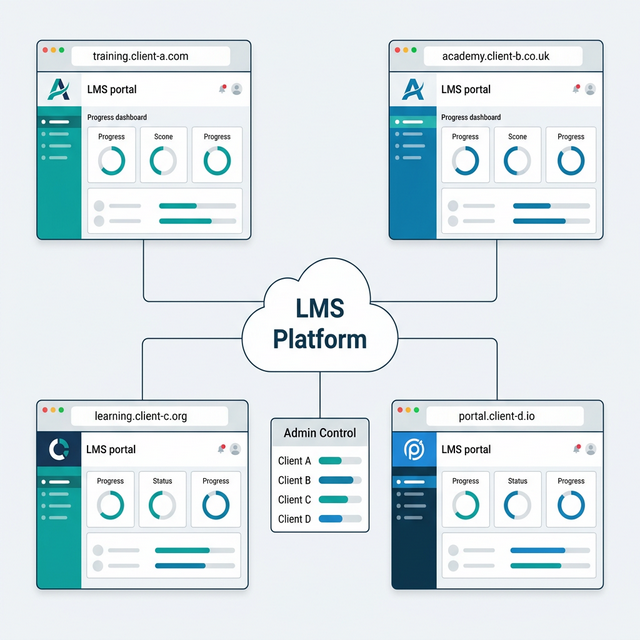
The global LMS market is valued at $28.9 billion in 2025 and is projected to reach $188.1 billion by 2035, growing at a CAGR of 20.6%. For training providers looking to capitalise on this growth, the question isn't whether to offer online training — it's whether to spend months building a platform from scratch, or launch a fully branded one in days.
That's exactly what a white-label LMS makes possible. This guide covers everything you need to know: what white-labelling actually means, who it's for, what features matter, how pricing works, and how to choose the right platform for your business.
What Is a White-Label LMS?
A white-label LMS is a pre-built learning management system that you rebrand and present as your own product. The vendor builds and maintains the core platform. You customise the appearance — logos, colours, domain, emails, certificates — so that every learner interaction looks and feels entirely like your brand.
Think of it as a blank-label product. The technology is built once. You apply your identity to it. Your learners never see a trace of the original vendor.
This matters because brand consistency across platforms can increase revenue by up to 23%, and brand recognition improves by up to 80% with a consistent colour palette. The alternative? Building a custom LMS from scratch typically requires 400–500 development hours for basic functionality alone, with costs ranging from £25,000 to £100,000+.
Why White-Label Matters: The Business Case
Brand Trust and Professional Credibility
When learners log into your training platform and see your logo, your colours, and your domain name in the URL bar, they trust the experience. A platform that redirects to a third-party tool — complete with someone else's branding — creates friction and erodes confidence.
This is especially critical for training providers selling to corporate clients. A fully branded, enterprise-grade platform helps smaller training companies present themselves as sophisticated, tech-enabled businesses — and win bigger clients with higher budgets.
Employees at organisations that invest in branding are 27% more likely to feel positive about their company's future. That sentiment extends to the learning experience.
Speed to Market
White-labelling eliminates the months (or years) of development that a custom build demands. Training providers can launch a fully branded learning portal in days or weeks — you're customising the surface, not engineering the core. 73% of SaaS businesses use white-label solutions specifically to save time and resources.
Revenue Growth and Financial Control
- Set your own prices without marketplace commissions eating into margins
- Offer subscriptions, one-off purchases, bundles, or corporate licensing
- Keep 100% of your earnings — no platform fees on each transaction
- Command premium pricing with an enterprise-grade branded experience
Real-world results back this up. One consultancy grew its client base by 250% and increased profit margins by 40% after adopting a white-label LMS. A healthcare provider generated 50% new revenue within 18 months from white-label training pilots.
The vendor handles updates, security patches, server maintenance, and infrastructure scaling. This shared infrastructure model delivers 30–55% lower infrastructure costs per client compared to single-tenant deployments.
White-Label LMS vs Custom-Built vs Off-the-Shelf
Not all LMS approaches are equal. Here's how the three main options compare:
| Factor | White-Label LMS | Custom-Built | Off-the-Shelf |
|---|---|---|---|
| Customisation | High — branding, UI, domain, emails, certificates | Unlimited — full code control | Limited — logo and basic colours |
| Time to launch | Days to weeks | 6–18 months | Immediate |
| Upfront cost | Monthly SaaS fee | £25,000–£100,000+ | Lower subscription |
| Maintenance | Vendor-managed | Requires IT team | Vendor-managed |
| Vendor branding visible? | No — fully removed | N/A | Yes — watermarks, footer links |
| Best for | Training providers, franchises, agencies | Large enterprises with unique needs | Small teams, tight budgets |
The Three Tiers of White-Labelling
Not all "white-label" claims are equal. Some vendors advertise white-labelling but only offer basic logo swaps. Before committing, understand what tier you're actually getting:
Complete White-Label
Every visible element carries your brand. No vendor references anywhere. This includes custom domain mapping, full UI control, branded mobile apps in app stores, white-labelled emails and certificates, multi-tenant portals with independent branding per client, and zero vendor watermarks or "Powered by" badges.
Partial White-Label
Most learner-facing elements are branded, but the vendor may appear in some areas — email footers, the mobile app, or admin dashboards. Mobile app white-labelling and full email customisation may be restricted or charged as add-ons.
Basic White-Label
Branding is limited to logo and colour changes. The vendor's name, domain, and identity remain visible throughout. This is often what you get on entry-level plans — and it's not truly white-label.
Key rule: Always ask specifically what "white-label" includes before committing. Hidden branding upgrade fees and mobile app add-on charges are common. Get a demo of the actual learner experience and check every touchpoint — login page, dashboard, emails, certificates, mobile view.
Key Features to Look For
Branding and Customisation
- Custom domain mapping — true DNS mapping (
learn.yourcompany.com), not a redirect. This affects SEO, brand trust, and long-term business value. - Full colour palette and font control across all pages
- Custom logo placement — login screens, dashboards, navigation bars, footers
- Branded email templates for notifications, enrolments, completions, reminders
- Custom certificates with your logo, design, signatory, and accreditation marks
- Custom terminology — rename "courses" to "modules" or "learner" to "delegate"
- Branded mobile app published under your name in app stores
Learning Standards
- SCORM 1.2 and SCORM 2004 for packaged eLearning content
- xAPI (Tin Can API) — tracks learning beyond the LMS into a Learning Record Store (LRS), avoiding vendor lock-in
- LTI for embedding external tools seamlessly
- Drag-and-drop course builders — no coding required
- Learning pathways and microlearning support
User Management and Integrations
- Role-based access control and SSO (SAML 2.0 / OAuth)
- Automated enrolment based on role, department, or start date
- Payment gateways — Stripe, PayPal, GoCardless
- CRM systems — Salesforce, HubSpot, Pipedrive
- Video conferencing — Zoom, Microsoft Teams
- Zapier and API access for custom workflows
Who Needs a White-Label LMS?
Training Providers & Resellers
Build content once, sell to many clients. Each gets their own branded portal — you manage everything from one admin dashboard. One consultancy grew its client base by 250% after switching to white-label.
Compliance & Regulated Industries
Food safety, healthcare, financial services, education. Branded certificates and audit trails under your own identity. A healthcare provider generated 50% new revenue in 18 months from branded compliance portals.
Franchises & Multi-Location
Restaurant chains, hotel groups, care networks, retail franchises. Standardised training with per-location branding, all controlled from one central dashboard.
B2B SaaS & Customer Education
Branded academies for product onboarding, feature training, and customer certification. Seamless with your product brand — not an obvious redirect to a third-party tool.
Multi-Tenant Architecture Explained
If you're serving multiple clients, multi-tenant architecture is the feature that makes everything scale. Think of it as an apartment building: one building (the software), many tenants (your clients). Each has their own private flat — their own data, keys, and décor — but they share the plumbing, electricity, and maintenance. When the building gets an upgrade, every flat benefits automatically.
| Aspect | Multi-Tenant | Single-Tenant |
|---|---|---|
| Infrastructure cost | 30–55% lower | Higher — dedicated resources per client |
| Scalability | Add tenants instantly | New deployment required per client |
| Maintenance | One update — all tenants benefit | Individual updates per instance |
| Data isolation | Logical separation (configurable) | Physical separation |
Pricing: What to Expect
| Scale | Annual Cost Range | Typically Includes |
|---|---|---|
| Small (100–300 users) | £800–£4,000/year | Core branding, SaaS hosting, standard reporting |
| Growing (500–1,000 users) | £4,000–£12,000/year | Deeper reporting, CRM integrations, API access |
| Enterprise (1,000+ users) | £12,000+/year | Dedicated hosting, tenant isolation, advanced analytics, compliance |
Competitor note: Entry-level plans on TalentLMS ($109/month), LearnWorlds ($29/month), and similar platforms often do not include full white-labelling. Branding upgrades, custom domains, and mobile app white-labelling are frequently gated behind higher tiers or sold as add-ons.
Hidden Costs to Watch For
- Branding upgrade fees — removing the vendor logo or adding a custom domain
- Mobile app white-labelling — often a separate annual fee for branded iOS/Android apps
- API access charges — some platforms restrict API use to enterprise tiers
- Storage limits — video-heavy programmes can exceed base storage quickly
- Migration fees — moving from an existing platform
- Support tiers — priority or dedicated support is rarely included in base plans
GDPR and UK Data Protection
For UK-based training providers, data protection is a legal requirement that directly affects your LMS choice. Non-negotiables include data minimisation, consent management, right to erasure, breach notification within 72 hours, SSL/TLS encryption, and signed data processing agreements with all third-party processors.
Questions to Ask Your LMS Vendor
- Where is learner data physically hosted? (UK, EU, US, or elsewhere?)
- Can users export and delete their data on request?
- Are timestamped audit logs maintained for compliance evidence?
- Is multi-factor authentication (MFA) available?
- Do you conduct regular security audits and penetration testing?
- Will you sign a data processing agreement?
- What happens to data if we leave the platform?
The 15-Step Implementation Checklist
Phase 1: Planning (Weeks 1–2)
- Define goals and KPIs — completion rates, satisfaction, revenue, compliance pass rates
- Assemble your team — project lead, content owner, technical contact (DNS/SSO), executive sponsor
- Audit existing content — what can be uploaded directly? What needs reformatting?
- Confirm integration requirements — SSO, CRM, payments, HR systems, video conferencing
Phase 2: Configuration (Weeks 2–3)
- Share branding assets — logo SVG/PNG, hex codes, fonts, certificate designs
- Configure your custom domain — set a CNAME DNS record pointing to the LMS
- Define user roles and permissions — admin, instructor, manager, learner
- Set up client portals — unique branding, domains, and configurations per tenant
Phase 3: Content and Testing (Weeks 3–4)
- Upload and organise content — SCORM packages, videos, assessments, pathways
- Customise email notifications — welcome, assignments, reminders, completions
- Apply white-label branding — walk every touchpoint; verify no vendor branding leaks
- QA on multiple devices — verify integrations, SCORM tracking, certificates, payment flows
Phase 4: Launch (Weeks 4–5)
- Train administrators — courses, user management, reports, troubleshooting
- Soft launch with a pilot group of 10–20 users — collect feedback, fix issues
- Full launch — enrol all users, send welcome communications, monitor analytics closely
How to Choose the Right Platform
The 12 Questions to Ask Every Vendor
- What level of white-labelling do you offer? Can I see a demo of the actual learner experience?
- Can I use my own custom domain? Is it true DNS mapping or a redirect?
- Is the mobile app fully branded under my name in app stores?
- Does branding extend to emails, certificates, and login screens — every touchpoint?
- Is multi-tenant architecture supported? How is data isolated between tenants?
- What integrations are available? CRM, payment gateways, SSO, HRIS, Zapier?
- Where is data hosted? Is it UK/EU GDPR compliant? Will you sign a DPA?
- What are the hidden costs? Branding upgrades, mobile app fees, API charges, storage?
- What reporting is available? Per-tenant? Compliance audit trails? Exportable data?
- What does onboarding and ongoing support look like?
- What is the SLA for uptime and issue resolution?
- Can I scale without significant cost increases?
Red flags to avoid: No learner-view demo available · "White-label" only on enterprise plans · Only subdomain offered (yourcompany.vendor.com) · No DPA offered · Proprietary content format with no SCORM/xAPI export
Frequently Asked Questions
Frequently asked questions
Ready to launch your own branded training platform?
Book a tailored demo of BespokeLMS to see complete white-labelling, multi-tenant architecture, and CPD-certified training delivery in action.
Book a free demo